tuptime – Report historical and statistical real time of the system, keeping it between restarts. Total uptime
tuptime calculates overall uptime of the system it’s running on. It also flags shutdowns as “BAD” if it comes up without having been gracefully stopped before.
As I grew up in an age where uptime braggery was common even among professionals, my entirely unreasonable use case here is to determine uptime since the previous unclean shutdown:
function tuptime-graceful () {
        local tuptime_since=1
        local temp_array
        while read -r line
        do
                if [[ "${line}" =~ ' BAD ' ]]
                then
                        read -r -a temp_array <<< "${line}"
                        tuptime_since=$(( temp_array[0] + 1 ))
                        break
                fi
        done < <(tuptime --table --order e --reverse)
        tuptime --since "${tuptime_since}"
}
Vielen Dank für eure Aufmerksamkeit. Es folgt eine unvollständige Liste einiger weniger Amazon-Alternativen.
Ich sage nicht, dass ich Amazon nicht benutze oder ihr Amazon nicht benutzen sollt. Ich sage lediglich, dass ich diese Shops bereits alternativ benutzt habe. (Updates folgen.)
Nothing serious, just a few notes I like to share with friends and colleagues who, like me, script around curl.
curl -f / --fail
I try to use --fail whenever I can, because why would I want to exit zero on server errors?
$ curl -L https://download.grml.org/grml64-small_2024.02.iso.NO
<!DOCTYPE HTML PUBLIC "-//IETF//DTD HTML 2.0//EN">
<html><head>
<title>404 Not Found</title>
</head><body>
<h1>Not Found</h1>
<p>The requested URL was not found on this server.</p>
<hr>
<address>Apache/2.4.41 (Ubuntu) Server at ftp.fau.de Port 443</address>
</body></html>
$ echo $?
0
$ curl -f -L https://download.grml.org/grml64-small_2024.02.iso.NO
curl: (22) The requested URL returned error: 404
$ echo $?
22
curl --fail-with-body
I have a CI/CD situation where curl calls a webhook and it’s incredibly useful to see its error message in case of failure.
$ curl --fail https://binblog.de/xmlrpc.php
curl: (22) The requested URL returned error: 405
$ curl --fail-with-body https://binblog.de/xmlrpc.php
curl: (22) The requested URL returned error: 405
XML-RPC server accepts POST requests only.
set -o pipefail
When curl‘s output gets piped to any other command, I try to remember to set -o pipefail along with curl --fail so if curl fails, the pipe exits non-zero.
#!/usr/bin/env bash

url='https://download.grml.org/grml64-small_2024.02.iso.NONO'

if curl -s -f -L "${url}" | sha256sum
then
        echo "Success."
else
        echo "Failure."
fi

set -o pipefail

if curl -s -f -L "${url}" | sha256sum
then
        echo "Success."
else
        echo "Failure."
fi
curl --connect-timeout
Useful to get quicker response in scripts instead of waiting for the system’s default timeouts.
curl -w / --write-out
This may be over the top most of the time, but I have one situation that requires extremely detailed error handling. (The reason being a bit of a foul split DNS situation in the environment, long story.) This is where I use --write-out to analyze the server response.
(Would be even nicer if a destination filename could be specified instead of needing to work with stdout only.)
curl -n / --netrc / [ --netrc-file ]
Username:password authentication is a thing, no matter how much it’s discouraged. Here’s how to at least hide username and password from the process list.
$ chmod 600 ~/.netrc
$ cat ~/.netrc
machine binblog.de
login foo
password bar
$ curl -v -o /dev/null -n https://binblog.de
...
* Server auth using Basic with user 'foo'
...
To use any other file instead of ~/.netrc, use --netrc-file instead.
Here’s the bug that neccessitatesthe --no-setuptools option: “ModuleNotFoundError: No module named ‘debian'”
mirror.list entry for the Mozilla Firefox APT repository:
deb-all [signed-by=/path/to/packages-mozilla-org.gpg] https://packages.mozilla.org/apt mozilla main
deb-amd64 [signed-by=/path/to/packages-mozilla-org.gpg] https://packages.mozilla.org/apt mozilla main
How to convert Mozilla’s sloppy ASCII-armored PGP key:
$ curl -s -O https://packages.mozilla.org/apt/repo-signing-key.gpg
$ file repo-signing-key.gpg
repo-signing-key.gpg: PGP public key block Secret-Key
$ mv repo-signing-key.gpg repo-signing-key
$ gpg --dearmor repo-signing-key
$ file repo-signing-key.gpg
repo-signing-key.gpg: OpenPGP Public Key Version 4, Created Tue May 4 21:08:03 2021, RSA (Encrypt or Sign, 2048 bits); User ID; Signature; OpenPGP Certificate
forkstat (8) – a tool to show process fork/exec/exit activity
High load without a single obvious CPU consuming process (not related to the Nextcloud shenanigans above) led me to forkstat(8):
Forkstat is a program that logs process fork(), exec(), exit(), coredump and process name change activity. It is useful for monitoring system behaviour and to track down rogue processes that are spawning off processes and potentially abusing the system.
Die Zubereitung ist eine ziemliche Geduldsprobe, dafür kann man aber außer bei der Karamellisierung fast nichts verkehrt machen, und sogar dann sind nicht so gut gelungene gebrannte Mandeln immer noch: Gebrannte Mandeln.
Zubereitungszeit
45 Minuten
Zutaten für eine große Bratpfanne
250 g Mandeln mit Haut
150 g Zucker
1 Beutel Vanillezucker
Einen gestrichenen Teelöffel Zimt, dazu zu Weihnachten gern einen Hauch Muskat, Nelken, Anis, Piment oder Pfeffer.
Etwas Wasser, ca. 100 ml
Werkzeug
Große Bratpfanne, beschichtet mit dem guten Mikroplastik
Holzlöffel
Backpapier
2 Gabeln
Zubereitung
50 g Zucker mit Vanillezucker und den Gewürzen verrühren und für später aufheben.
100 g Zucker mit gerade so wenig Wasser in die Pfanne geben, dass sich der Zucker auflösen kann.
Das Zucker-Wasser-Gemisch aufkochen.
Die Mandeln hinzugeben, und so lange bei höchster Hitze rühren, bis das Wasser verdampft ist und der Zucker kristallisiert. Danach noch kurz weiterrühren, bis an den ersten Mandeln braun glänzende Stellen zu erkennen sind.
Temperatur runterregeln (bei mir von 9 auf 6), die Mandeln gleichmäßig verteilen und den restlichen Zucker mit den Gewürzen gut verteilt drüberstreuen.
Ununterbrochen rühren, bis die Mandeln karamellisiert sind. Die Temperatur so niedrig halten, dass sich keine schwappende Karamellsoße in der Pfanne sammelt. Alles was flüssig ist, muss von den Mandeln sofort angenommen werden können.
Wenn die Mandeln nicht mehr krustig, sondern schön karamellisiert sind, den Pfanneninhalt so weit und locker wie möglich auf einem Bogen Backpapier verteilen, die Mandeln mit zwei Gabeln soweit möglich vereinzeln und abkühlen lassen.
Kurz nachdem ich vor einer Weile meinen guten Messschieber (Amazon-Link ohne Affiliation) bekommen hatte, hat mich bereits zufällig die 15-Euro-Schieblehre vom Bauhaus angelacht. Preislich lässt sie ganz Amazon hinter sich und Ebay gleich mit, und ich musste heute dem Drang nachgeben, sie für “draußen” anzuschaffen.
Etwas kratzig ist ihre Qualitätsanmutung schon, speziell beim Drehen des Rädchens und Spiel ist vorhanden und messbar, aber zumindest nicht als Klapprigkeit zwischen den Fingern spürbar. Zwischen mm/inch kann per einfachem Tastendruck umgeschaltet werden, die Verarbeitung am Austritt des Tiefenmaß finde ich sogar deutlich schöner als bei der Helios-Preisser. Für Preis/Leistung zu einem Siebtel des Preises gibts von mir den Daumen nach oben. 👍
$ sudo tee /etc/apt/sources.list.d/mozillateam-ppa.list <<Here
deb https://ppa.launchpadcontent.net/mozillateam/ppa/ubuntu jammy main
deb-src https://ppa.launchpadcontent.net/mozillateam/ppa/ubuntu jammy main
Here
$ sudo tee /etc/apt/trusted.gpg.d/mozillateam.asc < <(curl 'https://keyserver.ubuntu.com/pks/lookup?op=get&search=0x0ab215679c571d1c8325275b9bdb3d89ce49ec21')
500 Elektroautos waren an Bord, 500 Elektroautos wurden auf einem Deck entfernt vom Brandherd unbeschädigt vorgefunden, 500 Elektroautos gelten als Brandursache. Ganz normal.
Am 26. Juli 2023 geriet der Autofrachter Fremantle Highway in der Nordsee in Brand. Die Besatzung war gezwungen, das Schiff aufzugeben und zu verlassen, dabei kam tragischerweise ein Besatzungsmitglied ums Leben. Der Frachter trieb führerlos im Meer. Eine extrem bedrohliche Situation, denn die Fremantle Highway war gerade erst in Bremerhaven gestartet, hatte genug Schweröl für die Fahrt bis nach Singapur an Bord, und es drohte unmittelbar eine Ölpest im Wattenmeer.
Die niederländische Küstenwache wurde zitiert, dass brennende Elektroautos an Bord Löscharbeiten erschweren könnten (Electrek, 26.07.2023 in englischer Sprache, lokale Kopie hier). Bezogen auf Löscharbeiten an Bord, unter der Voraussetzung, dass tatsächlich ein Fahrzeugakku gebrannt hätte, wäre ja auch objektiv nicht auszuschließen, dass Schiff und Besatzung möglicherweise nicht auf diese Situation vorbereitet gewesen sein könnten.
Eine Aussage, dass tatsächlich ein Elektroauto den Brand verursacht hatte oder auch nur mit in Brand geraten war, war von keiner Stelle getroffen worden. Es soll hier auch noch einmal verdeutlicht werden, dass tausende mit Verbrennungsmotor betriebene Fahrzeuge ebenfalls an Bord waren, mit Benzin in den Tanks und leicht entzündlichem Kältemittel in den Klimaanlagen (Der Spiegel, 12.04.2011).
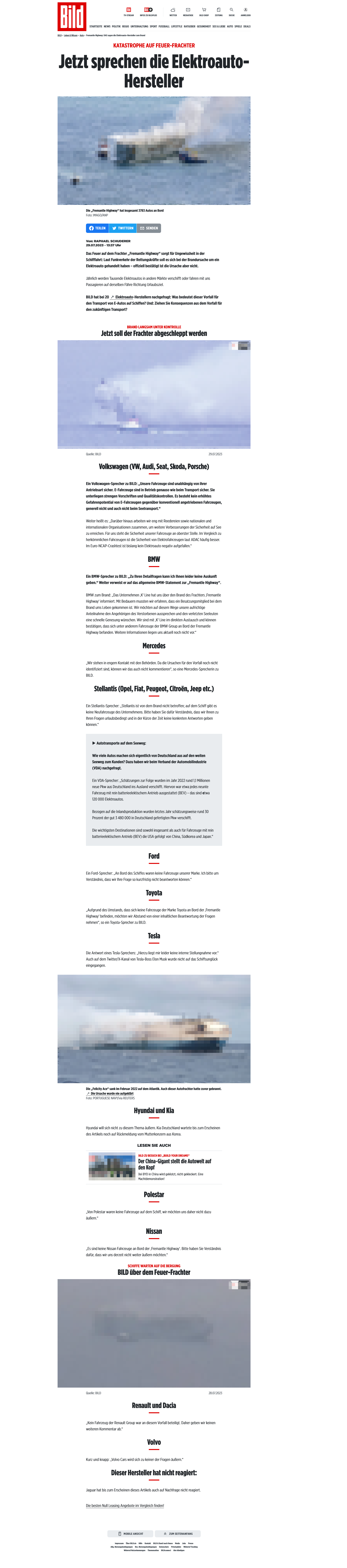
Nachdem die Bildzeitung (29.7.2023, lokale Kopie des Artikels hier) als ausgewiesene Brandexpertin die 500 Elektroautos als wahrscheinlichste Brandursache identifiziert und die Presseabteilungen der Hersteller zur Rede gestellt hatte, galt die Geschichte von den 500 brennenden Elektroautos als beschlossene Sache und die Angelegenheit begann in den Kommentarsektionen so richtig zu gären. 500 brennende Elektroautos als Zerstörer des Wattenmeers, und an allem Schuld sind die Ökos und die Grünen! Was für eine Wendung des Schicksals!
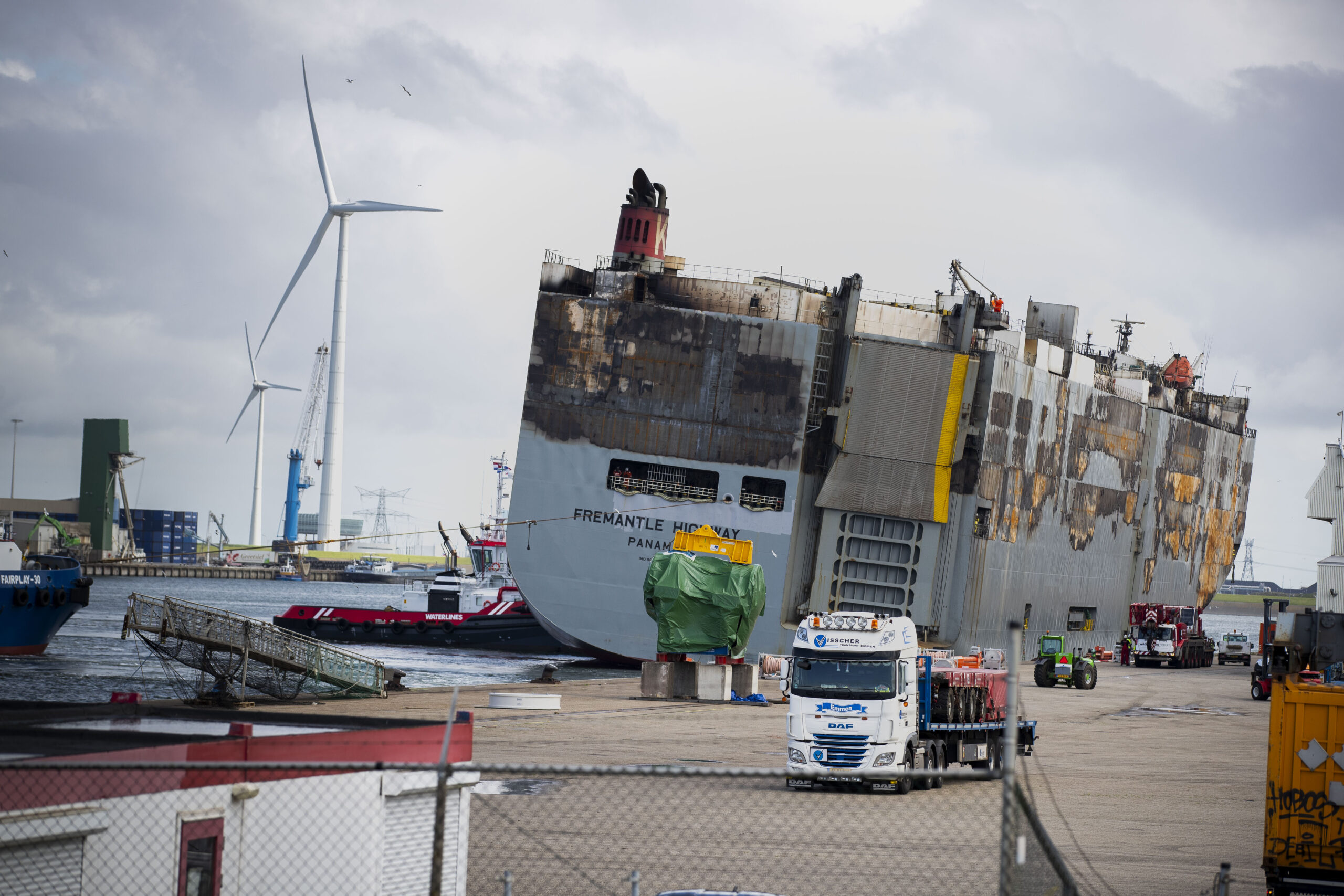
Die ausgebrannte Fremantle Highway – Quelle: Verteidigungsministerium der Niederlande
2 Wochen später war das Feuer aus, die Gefahr für die Umwelt glücklicherweise gebannt, und die Fremantle Highway in einen sicheren Hafen geschleppt worden. Hier wurde festgestellt (Tagesschau, 11.08.2023, lokale Kopie des Artikels hier), dass die 498 Elektroautos sich auf einem tiefer gelegenen Deck befanden und beim Brand unbeschädigt geblieben waren:
Bei der Inspektion wurde nun deutlich, dass die unteren vier der zwölf Decks weitgehend unbeschädigt sind. Auch etwa 1.000 Autos, darunter 500 elektrische, seien auf den ersten Blick in gutem Zustand.
(Tagesschau-Artikel vom 11.08.2023)
Wenn alle 498 Elektroautos in gutem Zustand an Bord stehen, sollte eigentlich klar sein, dass der Brand nicht von den 498 Elektroautos ausgegangen sein kann. Aus Gründen, die sich dem nüchternen Betrachter nur schwer erschließen, stehen die 498 Elektroauos aber weiter im Fokus und Experten haben Angst, dass die 498 Elektroautos, die überhaupt nicht gebrannt haben, sich bei der Bergung erneut entzünden könnten:
“Das kann sehr gefährlich sein.” Man will nicht, dass die Autos sich durch den Transport erneut entzündeten, “und alles Elend von vorne anfängt”.
(Tagesschau-Artikel vom 11.08.2023)
Die Geschichte der Fremantle Highway ist also für immer als die vom Schiff mit den brennenden Elektroautos abgelegt, auf dem kein einziges Elektroauto gebrannt hat.
Update vom 04.09.2023
Eine niederländische Quelle (eemskrant.nl, 30.08.2023, Link via Google Translate, Direktlink zum eingebetteten Youtube-Video) berichtete als erste, ein vom Feuer beschädigtes Elektrofahrzeug habe sich erneut entzündet. Dass der Mercedes sich “erneut” entzündet habe, wird von keinem anderen Medium so formuliert (z.B. Welt, 01.09.2023).
Die enorm dicke Verrußung des Mercedes bei ansonsten relativ gutem Fahrzeugzustand dürfte nicht von einem sofort unter Kontrolle gebrachten Entstehungsbrand stammen, sondern vom Feuer an Bord im vergangenen Juli. Dass die anderen Autos, die von Bord kommen, im Gegensatz dazu sauber sind, könnte daran liegen, dass sie, früheren Presseberichten zufolge (NDR, 19.08.2023), noch an Bord gewaschen werden. Auf dem Foto eines weißen BMW i4 sind grau-braune Spuren am Dach zu erkennen (oben bereits verlinkt, Welt, 01.09.2023).
Der gute Zustand der sichtbaren Reifen des Mercedes spricht gegen einen Akkubrand, der in Fetzen herunterhängende Unterboden dagegen zumindest für Schäden in diesem Bereich. Ob diese Schäden beim Löschangriff oder bei der Bergung des Fahrzeugs aufgetreten sind, kann von hier aus nicht gesagt werden. Eine leichte Rauchentwicklung ist erst zu sehen, während über einen gelben Schlauch links im Bild bereits Wasser in den Container eingeleitet wird.
Nach etlichen Sekunden-Stromausfällen, durchaus auch mal in schneller Folge nacheinander, hatte mich ein 40-minütiger Stromausfall endgültig über die Kante geschubst, und ich wollte meine Rechner mit unterbrechungsfreien Stromversorgungen ausstatten.
Ziel war eine USV-Integration, die:
Den angeschlossenen Rechner bei Stromausfall zuverlässig herunterfährt.
Und ihn auch zuverlässig wieder startet.
Utopische Batterielaufzeiten, um irgendwelche Uptimes zu retten, sind bei mir kein Thema, denn alle Systeme, die keine Eingabe einer Passphrase benötigen (also alle bis auf eines), reboote ich wöchentlich aus der Crontab.
First things first: Warum nicht den Marktführer? Warum nicht … APC?
Meine Meinung zu APC ist nicht die beste. Zum einen stört mich enorm, dass APC gefühlt immer noch die exakt selbe Hardware verkauft, sogar original ohne USB, die ich in einem anderen Jahrhundert(!) als Vertriebler im Großhandel verhökert habe. Der apcupsd für Linux scheint seit Ewigkeiten unmaintained, und die Hinweise zu den APC-Hardwaregenerationen bei den Network UPS Tools sind alles andere als ermutigend.
Hardwareauswahl
Der Weg zur richtigen Hardware, die die gewünschte Integration leistet, war steinig und von sehr schweren Pappkartons begleitet.
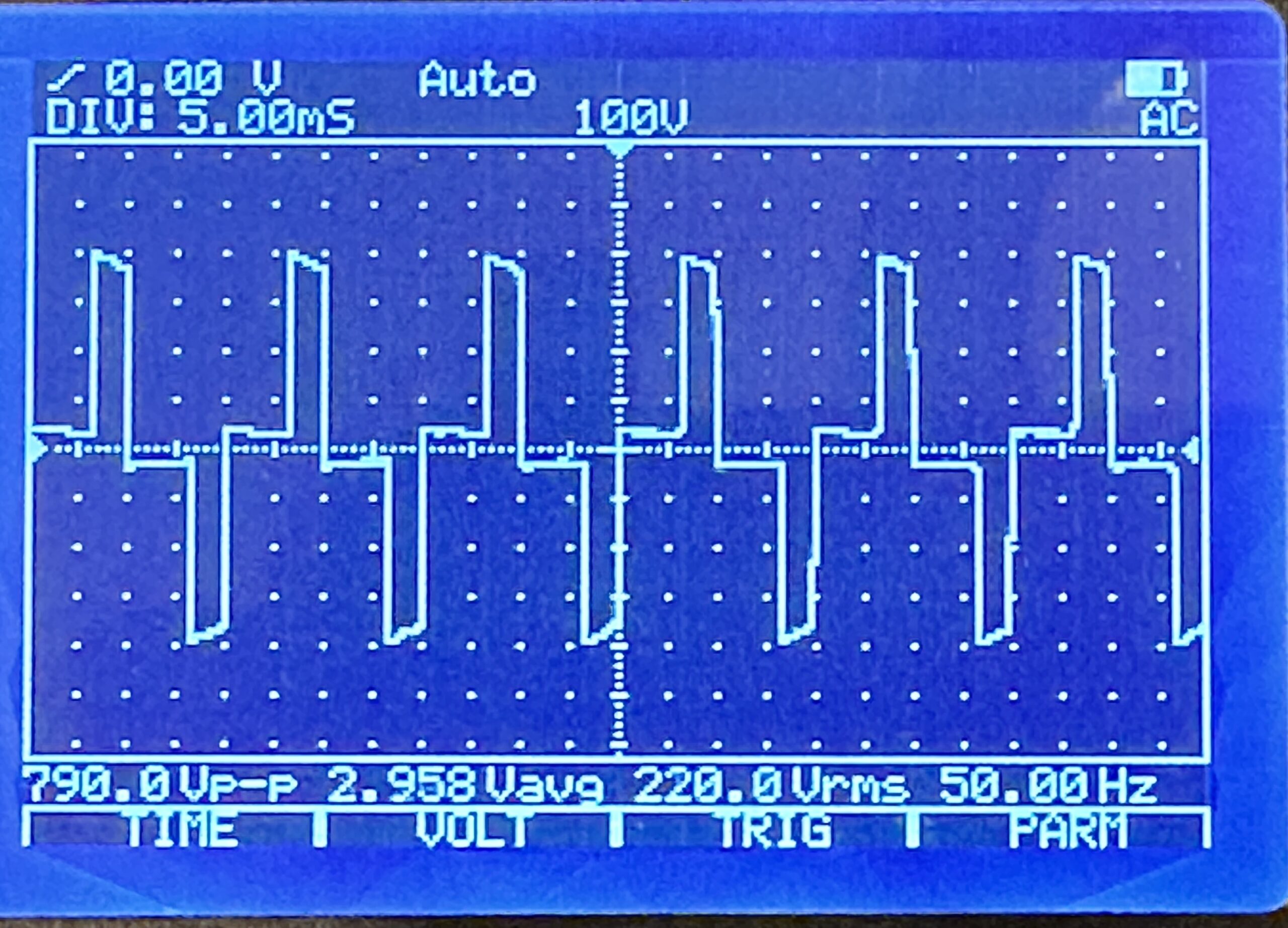
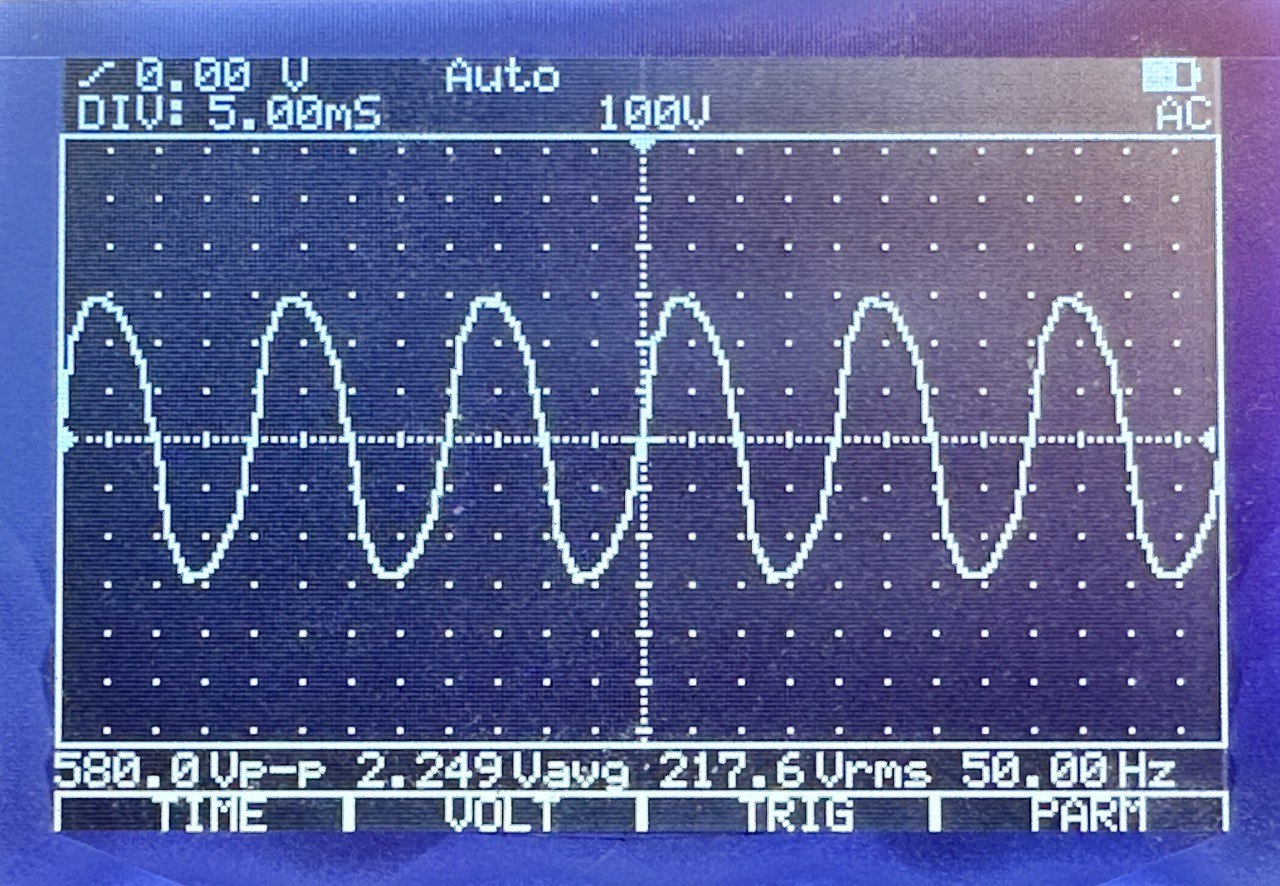
Für die meisten Anwendungsfälle tut es tatsächlich die wirklich billig-billige 50-Euro-USV von “BlueWalker PowerWalker”, wie sie der kleine Computerladen im Nachbardorf in allen Ausprägungen führt. Der Sinus ist hier allerdings nicht wirklich rund, sondern sehr sehr eckig, so dass er nicht mit jedem PC-Netzteil harmoniert.
Ein Gerät aus der “CSW”-Serie, “Clean Sine Wave” für ca. 150 Euro ebenfalls von “BlueWalker PowerWalker” weigerte sich, das System nach Wiederherstellung der Stromversorgung zuverlässig wieder hoch zu fahren.
Eine “Cyberpower”-USV hatte das beste User-Interface direkt am Panel, zählte die Sekunden der jeweiligen Timings live runter, war aber leider Dead On Arrival mit einem Akku, der wie ein Stein runterfiel, ohne dem angeschlossenen System wenigstens mal 30 Sekunden Zeit zum Runterfahren zu geben.
Nachdem ich einige Wochen Frust geschoben hatte, ging es wieder mit einer PowerWackler weiter, diesmal mit der BlueWalker PowerWalker VI 800 SW. Ein Billiggerät, sieht billig aus, hat ein aus einem Blickwinkel von ca. 0.5 Grad ablesbares LC-Display, und: Funktioniert! Der Sinus ist ulkig windschief, das tut der Funktion aber keinen Abbruch.
Integration
Nach den ersten Tests und der Erkundung der Möglichkeiten, standen meine Wünsche endgültig fest:
30 Sekunden nach dem Stromausfall soll das System runterfahren.
Kommt innerhalb der 30 Sekunden der Strom wieder, soll der Shutdown abgebrochen werden.
60 Sekunden nach dem Shutdown soll das System ausgeschaltet werden.
Kommt während oder nach dem Shutdown der Strom wieder, soll die USV wissen, dass sie das Ding jetzt durchziehen und das System trotzdem aus- und nach einer Wartezeit wieder einschalten soll.
Ist der Stromausfall beendet, soll das System wieder automatisch eingeschaltet werden.
Mit der richtigen USV ist all das problemlos zu konfigurieren. Leider habe ich mir ärgerlich viel Zeit um die Ohren geschlagen, weil ich immer wieder Fehler auf meinem System in meiner Konfiguration gesucht habe.
NUT-Architektur
Die Network UPS Tools (“NUT”) teilen ihren Stack in 3 1/2 Schichten auf:
Der NUT-Treiber übernimmt die Kommunikation mit der USV und stellt sie modellunabhängig den nachgeordneten Schichten zur Verfügung.
Der NUT-Server stellt die Events der USV per TCP bereit, für localhost, oder auch für per Netzwerk angebundene Systeme, die keine lokale USV haben.
Der NUT-Monitor reagiert auf Events, die er vom Server erhält, hierbei kann der Server entweder lokal laufen, oder über das Netzwerk erreicht werden.
Der NUT-Scheduler als Teil des NUT-Monitor führt diese Events aus und verfolgt sie im zeitlichen Ablauf.
Ich habe mich überall für Konfigurationen vom Typ “Netserver” entschieden, bei denen aber der NUT-Server hinter einer lokalen Firewall für Verbindungen von außen geblockt ist.
NUT-Treiber
Der NUT-Treiber ist, wenn man einmal akzeptiert hat, dass die USVen alle buggy Firmware haben und man nie bei NUT die Schuld für Fehlfunktionen zu suchen hat, ganz einfach zu konfigurieren. Außer der Auswahl des passenden Subtreibers ist lediglich zu beachten, dass die USV-Firmwares die Timings mal in Sekunden, mal in Minuten und mal gemischt(!) entgegennehmen. Bei manchen darf auch kein ondelay von unter 3 Minuten konfiguriert werden. Was weiß denn ich. Eine /etc/nut/ups.conf:
# /etc/nut/ups.conf für BlueWalker PowerWalker VI 800 SW
maxretry = 3 # Erforderlich

[ups]
        driver = blazer_usb # Wahrscheinlichste Alternative: usbhid-ups
        port = auto
        offdelay = 60       # Zeit bis zum Ausschalten nach Shutdown in Sekunden
        ondelay = 3         # Mindestwartezeit bis zum Wiedereinschalten in Minuten
NUT-Server
Der NUT-Server ist etwas unübersichtlich zu konfigurieren, insbesondere bei der Rollenzuweisung im Rahmen seiner Userverwaltung. Die zentrale Konfigurationsdatei /etc/nut/nut.conf ist aber noch äußerst übersichtlich:
# /etc/nut/nut.conf
MODE=netserver
/etc/nut/upsd.confhabe ich inhaltlich leer gelassen (Voreinstellung, alles auskommentiert), hier können für den Netzwerkbetrieb Zertifikate und/oder für den lokalen Betrieb die Bindung auf Localhost konfiguriert werden.
In /etc/nut/upsd.users wird der User angelegt, mit dem sich der NUT-Monitor beim Server anmelden wird. Bei “upsmon master” scheint es sich um eine Art Macro zu handeln, das bestimmte Rechte für den User vorkonfiguriert; die Doku ist nicht allzu verständlich und es ist möglich, dass die expliziten “actions” hier redundant konfiguriert sind. Ansonsten wird hier explizit festgelegt, dass der User “upsmon” mit dem Passwort “xxx” “Instant Commands” an die USV senden darf, dass er mit SET diverse Einstellungen an ihr vornehmen darf, und dass er den FSD, den Forced Shutdown, einleiten darf.
# /etc/nut/upsd.users
[upsmon]
        password = xxx
        instcmds = ALL
        actions = SET
        actions = FSD
        upsmon master
NUT-Monitor
Der NUT-Monitor ist die Kernkomponente, die tatsächlich den Shutdown des Systems einleiten und/oder abbrechen wird.
Zunächst muss die Kommunikation mit der USV namens “ups” mit dem User “upsmon” etabliert werden. “master” bedeutet, dass die USV hier am System lokal angeschlossen ist, die 1 ist eine Metrik für den Fall, dass mehrere USVen angeschlossen sind. Erhaltene Events werden an den NUT-Scheduler delegiert, und es sollen ausschließlich die Events ONLINE und ONBATT behandelt werden.Hier nur die relevanten zu ändernden Zeilen aus /etc/nut/upsmon.conf:
Dem NUT-Scheduler wird der Pfad zu einem Shellscript übergeben, das den Shutdown des Systems handhaben wird. Die beiden Werte PIPEFN und LOCKFN haben keine Voreinstellungen und müssen sinnvoll belegt werden. Hier die komplette /etc/nut/upssched.conf:
# /etc/nut/upssched.conf
# https://networkupstools.org/docs/user-manual.chunked/ar01s07.html
CMDSCRIPT /usr/local/sbin/upssched-cmd
PIPEFN /run/nut/upssched.pipe
LOCKFN /run/nut/upssched.lock
AT ONBATT * START-TIMER onbatteryshutdown 30
AT ONLINE * CANCEL-TIMER onbatteryshutdown
AT ONBATT * EXECUTE onbattery
AT ONLINE * EXECUTE online
Wenn der Event ONBATT behandelt wird, die USV sich also im Batteriebetrieb befindet:
Wird ein Timer gestartet, der in 30 Sekunden das CMDSCRIPT mit dem Argument onbatteryshutdown ausführen wird.
Wird das CMDSCRIPT ausgeführt mit dem Argument onbattery, das die eingeloggten User über den Stromausfall und den in 30 Sekunden bevorstehenden Shutdown informiert.
Wenn der Event ONLINE behandelt wird, die USV sich also nicht mehr im Batteriebetrieb befindet:
Wird der zuvor gestartete Timer abgebrochen.
Wird das CMDSCRIPT ausgeführt mit dem Argument online, das die eingeloggten User über den abgebrochenen Shutdown informiert.
CMDSCRIPT /usr/local/sbin/upssched-cmd
Das Herz des Systems ist natürlich in liebevoller Manufakturqualität selbstgescriptet. Der Shutdown selbst wird mit /sbin/upsmon -c fsd bei NUT-Server in Auftrag gegeben, der theoretisch auch noch die Aufgabe hätte, die Shutdowns von per Netzwerk angebundenen Systemen abzuwarten. Bei diesem Forced Shutdown sagt NUT-Server der USV Bescheid, dass der Shutdown jetzt durchgezogen wird und sie nach der im NUT-Treiber konfigurierten offdelay die Stromversorgung auch wirklich aus- und nach Wiederherstellung der Stromversorgung, oder einer Mindestwartezeit, wieder einschalten soll.
#!/usr/bin/env bash
me_path="$(readlink -f "$0")"

case "${1}" in
        'onbattery')
                /usr/bin/logger -p daemon.warn -t "${me_path}" "UPS on battery."
                /usr/bin/wall <<-Here
                $(figlet -f small BLACKOUT)
                $(figlet -f small BLACKOUT)
                +++++ SYSTEM WILL SHUT DOWN IN 30 SECONDS. +++++
                Here
                ;;
        'onbatteryshutdown')
                /usr/bin/logger -p daemon.crit -t "${me_path}" "UPS on battery, forcing shutdown."
                /usr/bin/wall <<-Here
                $(figlet -f small BLACKOUT)
                $(figlet -f small BLACKOUT)
                +++++ SYSTEM IS SHUTTING DOWN  N O W. +++++
                Here
                /sbin/upsmon -c fsd
                ;;
        'online')
                /usr/bin/logger -p daemon.warn -t "${me_path}" "UPS no longer on battery."
                /usr/bin/wall <<-Here
                $(figlet -f small SHUTDOWN)
                $(figlet -f small ABORTED)
                Power restored. Shutdown aborted. Have a nice day. <3
                Here
                ;;
        *)
                /usr/bin/logger -p daemon.info -t "${me_path}" "Unrecognized command: ${1}"
                echo '?'
                ;;
esac